![TYP_Logo-09-1.png]](https://help.thankyoupayroll.co.nz/hs-fs/hubfs/TYP_Logo-09-1.png?height=40&name=TYP_Logo-09-1.png)
Updated: May 2026
When you receive a notice from Ministry of Justice about a payment, you must start making those deductions from the employee's pay. Our system can manage this easily.
.png?width=52&height=52&name=Info%20-%20Blue%20Block%20(1).png) Ministry of Justice fines are entered in the Employee Profile and automatically added to the employee's pay summary. You do not add them manually to a timesheet.
Ministry of Justice fines are entered in the Employee Profile and automatically added to the employee's pay summary. You do not add them manually to a timesheet.
*Ministry of Justice fines are deducted from the employee's net wages and passed on by us to the Ministry when the pay is processed.
Where do I add this MOJ payment?
Ministry of Justice fines are managed in the employee's Employee Profile.
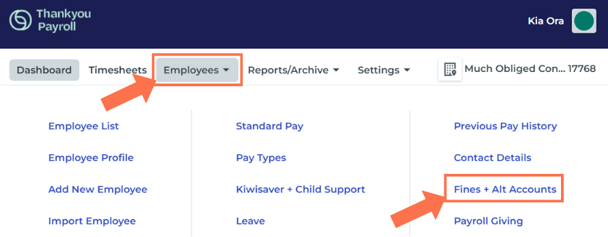
Go to 'Employees' and select 'Fines + Alt Accounts' from the dropdown menu. Be sure to select the correct employee from the employee list.

|
Important to Note: This tab only processes Ministry of Justice fines with reference numbers starting PP. All other reference numbers go to different bank account numbers and we can not guarantee to retrieve funds paid here in error. |
*For all other court order fines create a custom pay type, similar to our example for WINZ.
This tab works a little differently from our other tabs as the save funtion is the green + button:
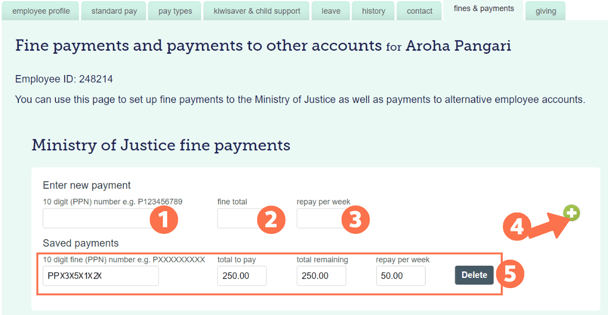
- In the first box, enter the 10-digit reference number stated on the notice. This number always starts with PP.
- In the middle box, enter the total of the fine.
- In the right box, enter the amount to deduct from the employee's pay every week.
- Click 'the green + button' to save this information.
- The fine will display under the 'Saved payments'
- You can delete the fine by pressing the delete button, it will also automatically stop once the full amount is paid.
- The 'total remaining' is adjusted each time a pay is processed.
What will I see in the employee's timesheet?
Ministry of Justice fine repayments will automatically be added in Pay Summary from the date the fine is entered in the 'Fine & Payments tab' until the total of the fine is repaid.
The Ministry of Justice's fine repayment is displayed in a separate line, along with the instalment amount and remaining balance after this pay.
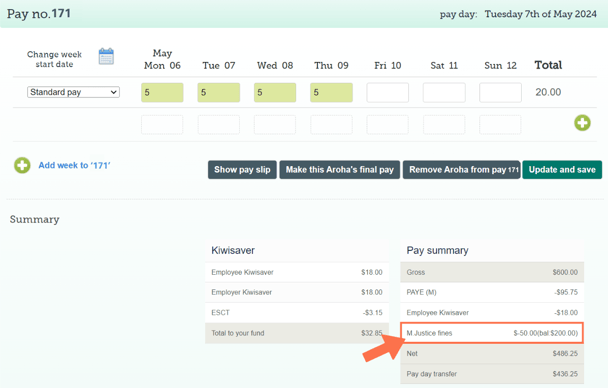
The balance remaining does not appear on the employee's payslip.
You can find this information in their 'Fines and Payments' tab - see box 5 above.