![TYP_Logo-09-1.png]](https://help.thankyoupayroll.co.nz/hs-fs/hubfs/TYP_Logo-09-1.png?height=40&name=TYP_Logo-09-1.png)
Updated: June 2026
The Thankyou Payroll Dashboard can handle multiple pays loaded in advance. However, there are certain things to be aware of especially if you are funding your pay with a Direct Debit.
In this article:
Direct Debit Funding Order
If you have multiple pays loaded on the dashboard, it is easy to miss a Direct Debit being confirmed.
This can result in the unfunded pay not processing and the Direct Debit funds for the next pay being applied to the unfunded pay.
For this reason, we recommend limiting the number of pays you have on your dashboard.
.png?width=52&height=52&name=Info%20-%20Blue%20Block%20(1).png) Golden Rule for Direct Debit Funding:
Golden Rule for Direct Debit Funding:
Pays are funded in numerical order, from the lowest number to the highest number.
*So any funds received will be applied to the lowest pay number first until that pay is funded, then to the next pay number up.
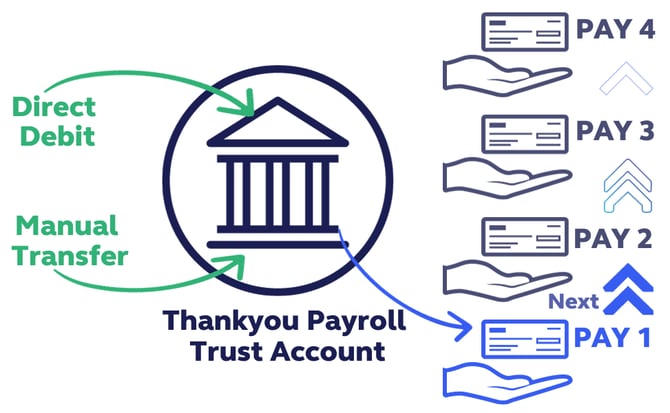
Think of it this way:
Funds are not connected to a specific pay number.
Pay 1 at the bottom of the dashboard will process first, so will receive any funds deposited first. Then Pay 2, then Pay 3, upwards. Doesn't matter if they are funded with a Direct Debit or manual transfer.
If Pay 1 is not fully funded, it will wait until enough funds arrive to fully fund this pay. Pay 2 will not process until Pay 1 is completed.
What happens if I miss a Direct Debit?
An unfunded, or partly funded pay will remain on the dashboard until it is fully funded. This pay has to be processed before pays above it will run.
The most common implications of missed Direct Debits are:
- Random pay dates as pays process once fully funded - which could later than planned.
- Fees may be increased.
Common Questions about Multiple Pays for Direct Debiting
Click on a question below to investigate
Take care to delete any unneeded pays you do not intend to run, e.g. doing a final pay projection dummy run for an employee who has resigned.
* If you leave a pay on the dashboard it will process once it becomes fully funded and the pay date is reached.
* If you don't want to delete the projection, change the pay date to move it up above the pays you do want to process.
Now that you know how to manage multiple pays on the dashboard you can use this feature to make your payroll work for you, even when you are on leave.
Easy as that!